3D Gaussian Splatting Experiments
Motivation
In the previous post, we looked at the history of Gaussian Splatting. Now, let’s look at some experiments with 3D Gaussian Splatting and validation of the results. Also, I want to learn this as kinda of like top-down approach. So, I will start with running the 3DGS pipeline on a custom dataset and then analyze the results. The goal is to understand how the pipeline works end-to-end and to validate that it produces reasonable results on a real-world scene.
Objective
It was to run the 3DGS implementation en-to-end on a custom dataset. (self-capmtured indoor scene) for the first time and validate the results.
- Experience the full pipeline: COLMAP SfM → 3DGS training → point cloud output → viewer visualization
- Verify that training converges and produces visually reasonable results on a custom scene
- Obtain baseline quantitative metrics (PSNR / SSIM / LPIPS) for future comparison
First Run Gaussian Splatting.
The meta for first time running the 3DGS pipeline on playroom dataset. (225 Images). My GPU was NVIDIA GeFORCE RTX 2070 Super (8GB VRAM) and the training took about 2 days to complete. The viewer were used to visualize the output point cloud.
The config was as follows:
Namespace(
  data_device='cuda',
  eval=False,            # ← BUG: no train/test split → metrics are NaN
  images='images',
  resolution=-1,         # original resolution
  sh_degree=3,           # Spherical Harmonics degree
  source_path='C:\\Users\\skcjf\\project\\gaussian-splatting\\data\\my_scene\\playroom',
  model_path='./output/858ba1ea-e',
  train_test_exp=False,
  white_background=False
)
Results
- Training time: ~2 days (RTX 2070 Super)
- Iterations: 30,000 (checkpoints at 7,000 and 30,000)
- Output:
gaussian-splatting\output\858ba1ea-e\point_cloud\iteration_30000
Then I did not get the results that I expected because I did not add –eval flag to the config, so I got NaN for all the metrics. But the point cloud output looked reasonable and the viewer visualization showed a decent reconstruction of the scene. The PSNR, SSIM, and LPIPS metrics were not computed due to the missing evaluation flag, so I will need to rerun with –eval to get those quantitative results.
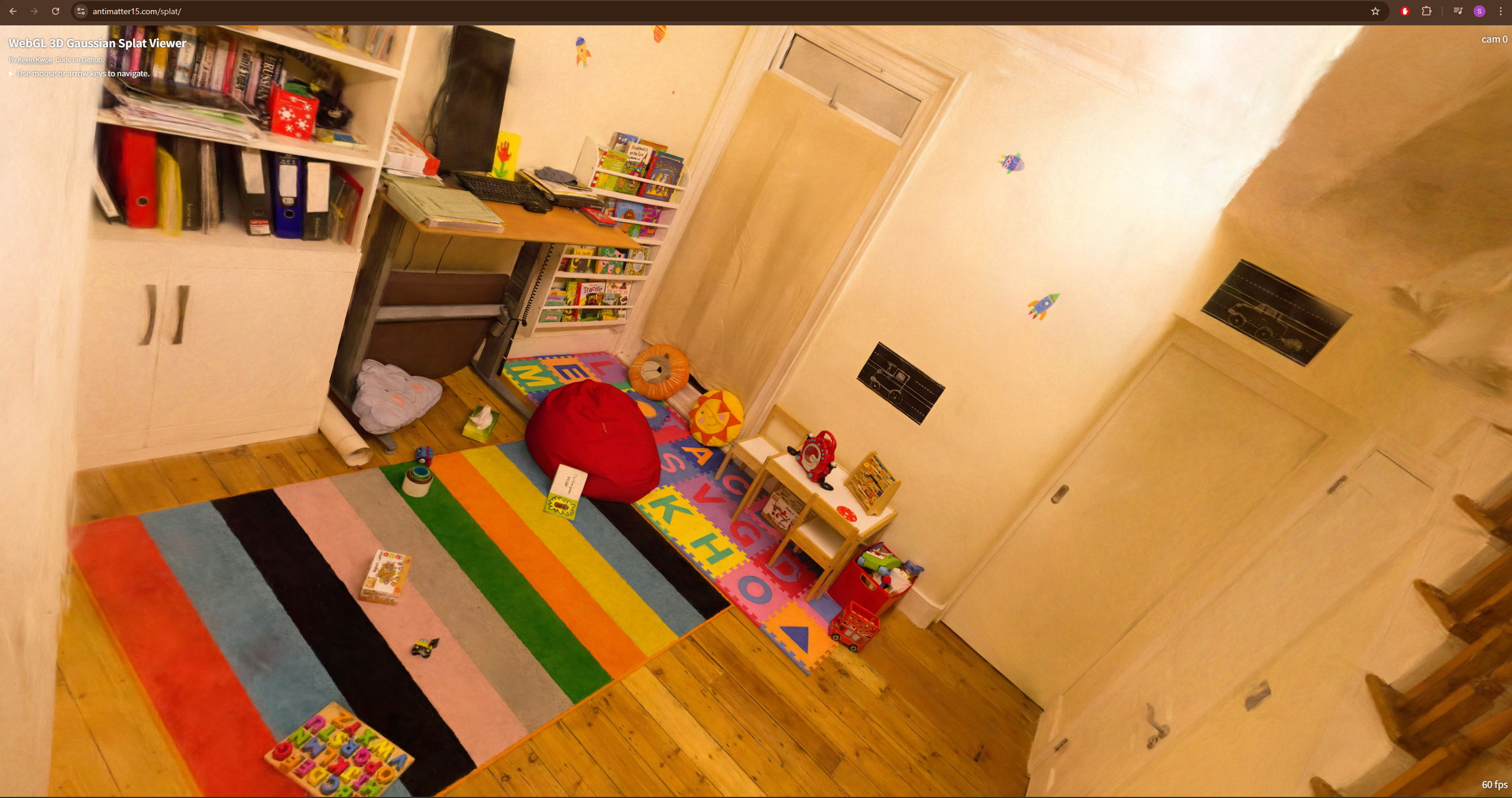
Iteration Comparison in Point Cloud Output:
| Iteration | 7K | 30K |
|---|---|---|
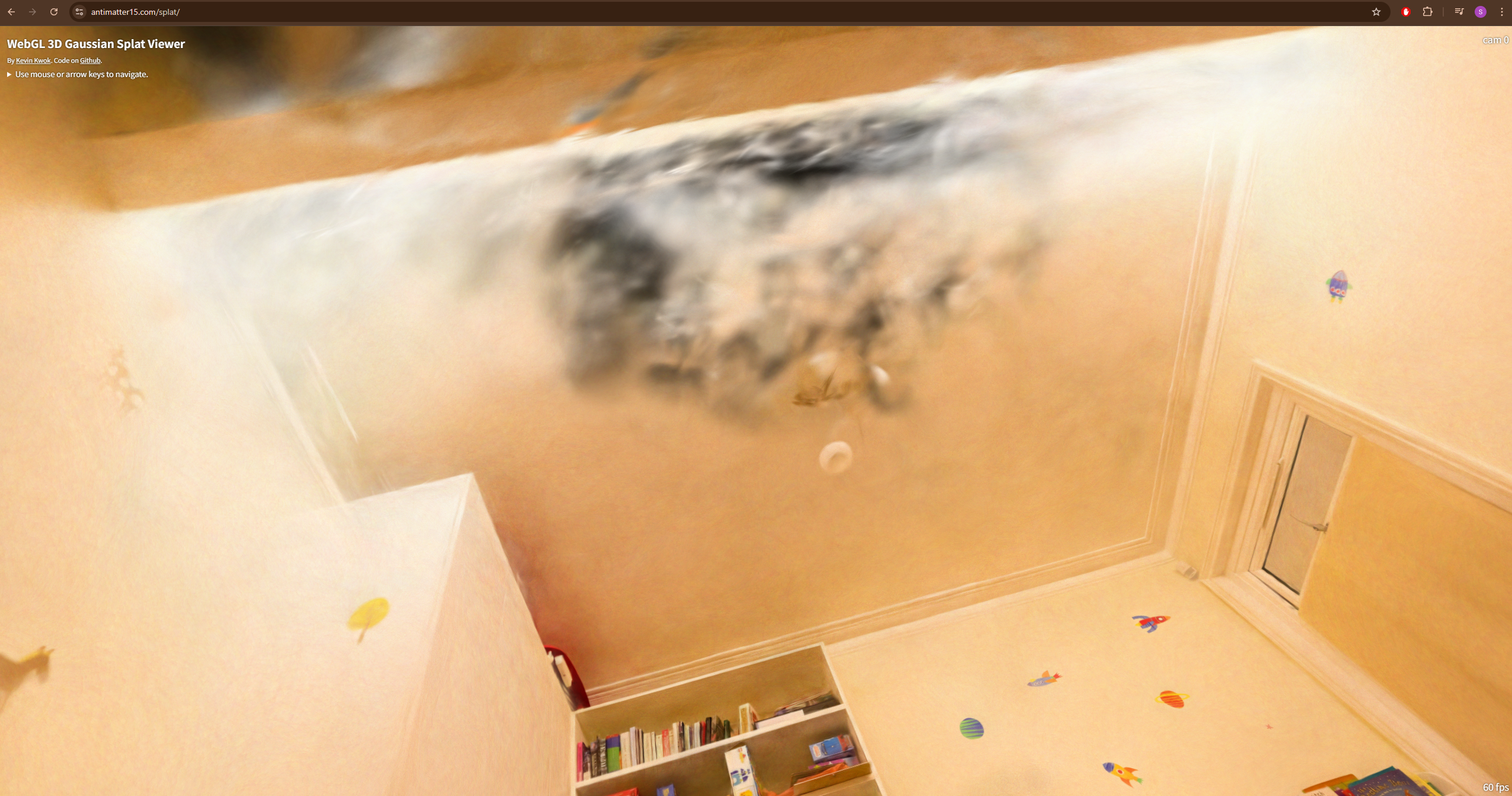 | 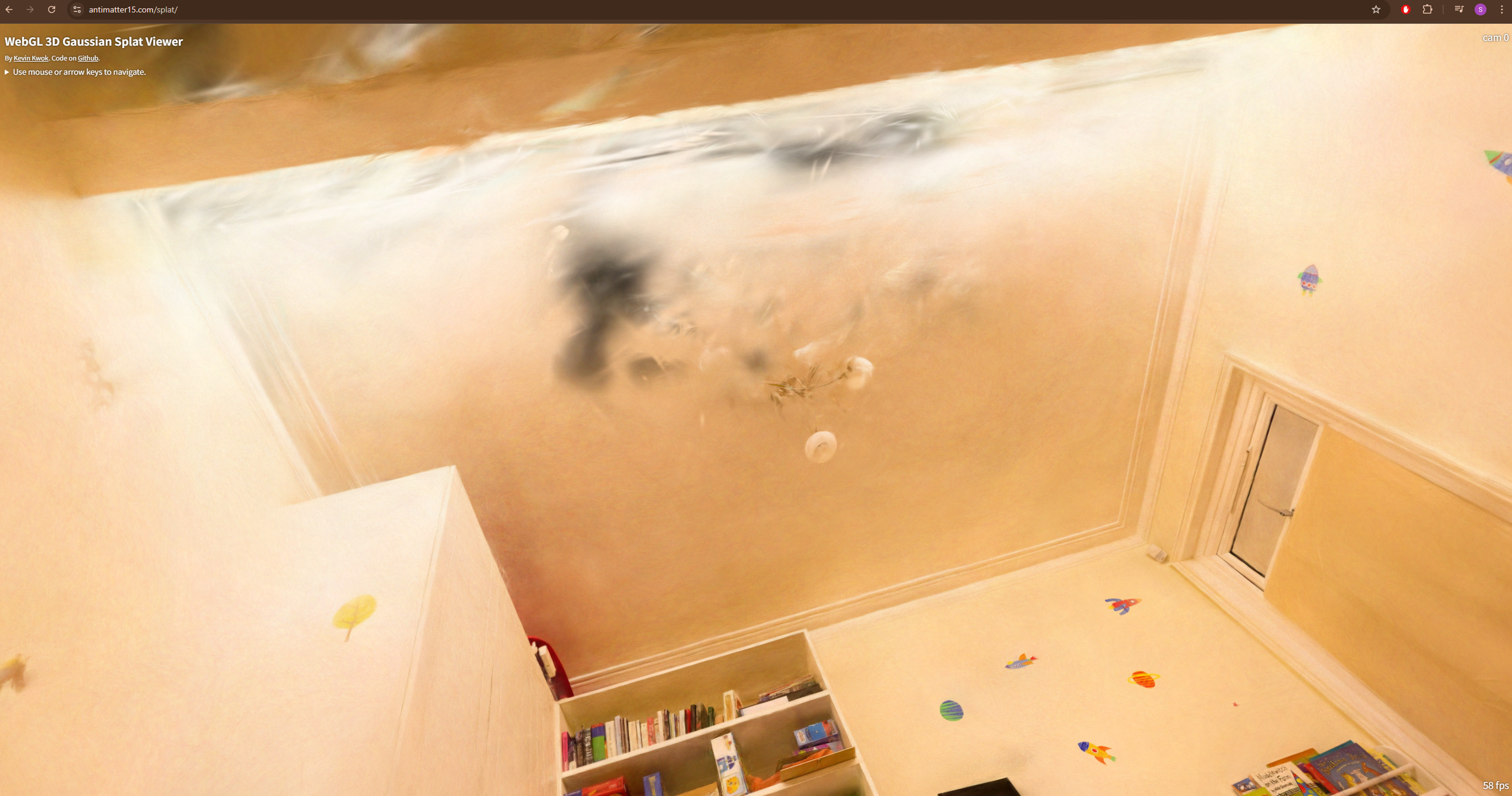 |
- Front-facing view (looking into the room): 7k and 30k are nearly identical
- Looking up at the ceiling: visible holes/gaps → likely insufficient training views from upward angles, or densification did not cover that region adequately
Problem Encountered:
- Output folder names are random hashes (e.g.
858ba1ea-e), so locating the actual results was initially confusing - No build errors; used a separate Python virtual environment
- Training took ~2 days on RTX 2070 Super, which saturated the GPU entirely (couldn’t even run YouTube simultaneously)
- 4 total attempts, 3 failed/aborted before the successful run
Second Run with Evaluation
Objective
Run 3DGS on a standard benchmark dataset with --eval enabled to obtain real quantitative metrics (PSNR/SSIM/LPIPS) for the first time. This fixes the [[3DGS First Run]] problem where eval=False produced NaN metrics.
- Validate that the 3DGS pipeline produces results consistent with the original paper
- Establish a quantitative baseline for future experiments (hyperparameter tuning, ablation)
- Learn the full evaluation pipeline: train → render → metrics
I choose to use Google Colab for this run to leverage a more powerful GPU (A100 40GB with High RAN) and faster training times. Then, I ran multiple data (tandt_db / Mip-NeRF 360 dataset) as well to validate the results from paper.
The config was as follows:
Namespace(
  sh_degree=3,
  source_path='/content/gaussian-splatting/data/tandt/train',
  model_path='/content/drive/MyDrive/3dgs_output/train',  # NOTE: mislabeled — actual scene is "train"
  images='images',
  resolution=-1,         # original resolution
  white_background=False,
  train_test_exp=False,
  data_device='cuda',
  eval=True              # FIXED from First Run — train/test split enabled
)
Results
| Metric | Value |
|---|---|
| PSNR | 22.12 |
| SSIM | 0.822 |
| LPIPS | 0.196 |
| Gaussians | 1,095,714 |
| Iterations | 30,000 (checkpoints at 7,000 / 30,000) |
| GPU | A100 40GB (Google Colab) |
These were the metrics using for the dataset: tandt_db(train). The PSNR and SSIM values are consistent with the original 3DGS paper, which reported PSNR around 22-23 and SSIM around 0.8 for similar scenes. The LPIPS value of 0.196 also indicates a reasonably good perceptual quality compared to the ground truth images. The number of Gaussians (1,095,714) is also in line with expectations for a scene of this complexity.
Problems Encountered
- Mip-NeRF 360 dataset URL (
storage.googleapis.com) returned 404 — dead link - Initial
!unzipextracted to wrong path →Could not recognize scene type!error. Fixed by ensuringsparse/0/was in the correct location.
What I Learned
--evalis mandatory for quantitative evaluation — without it, no train/test split occurs- 3DGS with default config on standard benchmarks reproduces paper results — the pipeline works
- A100 vs RTX 2070 Super is a massive speed difference — Colab is the practical choice for experimentation
- Dataset URL availability is not guaranteed — always have backup sources
Third Run with Mip-NeRF 360 Dataset
Objective
Experimentally verify the impact of 3 key 3DGS hyperparameters on the Mip-NeRF 360 dataset:
sh_degree: Spherical Harmonics degree (controls angular detail) for Kitchen Scene
The goal is to understand how these hyperparameters affect the final rendered quality (PSNR/SSIM/LPIPS) and visual appearance of the output point cloud. I will run multiple experiments varying one hyperparameter at a time while keeping others fixed, and then analyze the results.
Platform:
Google Colab with A100 High RAM for all experiments to ensure consistent training times and results.
Hyperparameter 1: Spherical Harmonics Degree (sh_degree)
- Kitchen scene contains many reflective surfaces — stainless steel appliances, faucets, tiles
- Higher SH degree enables more detailed view-dependent color changes (specular, highlights) as camera angle changes
- Degree 0 = flat color (diffuse only), Degree 3 = highlights and reflections supported
Parameters:
# sh0
python train.py -s data/mipnerf360/kitchen --eval --sh_degree 0 -m .../kitchen/sh0
# sh1
python train.py -s data/mipnerf360/kitchen --eval --sh_degree 1 -m .../kitchen/sh1
# sh2
python train.py -s data/mipnerf360/kitchen --eval --sh_degree 2 -m .../kitchen/sh2
# sh3 (default)
python train.py -s data/mipnerf360/kitchen --eval --sh_degree 3 -m .../kitchen/sh3
Results
| Degree | SH Coefficients | SSIM | PSNR | LPIPS | Iterations | | —— | ————— | ——— | ———- | ——— | ———- | | 0 | 1 | 0.9244097 | 30.6005344 | 0.1243820 | 7k | | 1 | 4 | 0.9281715 | 31.0590820 | 0.1205885 | 7k | | 2 | 9 | 0.9311565 | 31.2686272 | 0.1176810 | 30k | | 3 | 16 | 0.9326434 | 31.5447502 | 0.1158840 | 7k |
- Note: sh0, sh1, sh3 trained at 7k iterations, sh2 at 30k → metrics for sh2 may be overestimated. Re-run with unified iteration count for fair comparison.
| Image Index | Description | Image |
|---|---|---|
| 18 | SH degree 0 ~ 3 with ground truth Comparison | 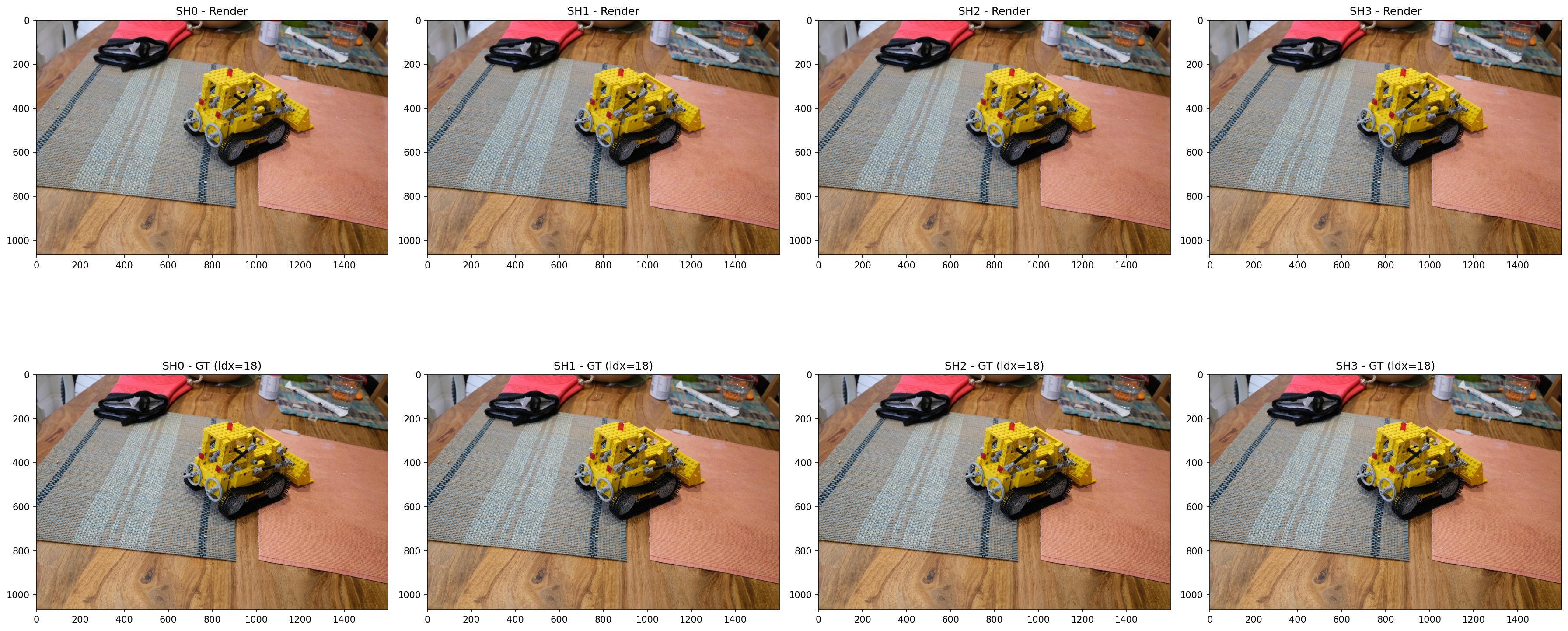 |
| 20 | SH degree 0 ~ 3 with ground truth Comparison | 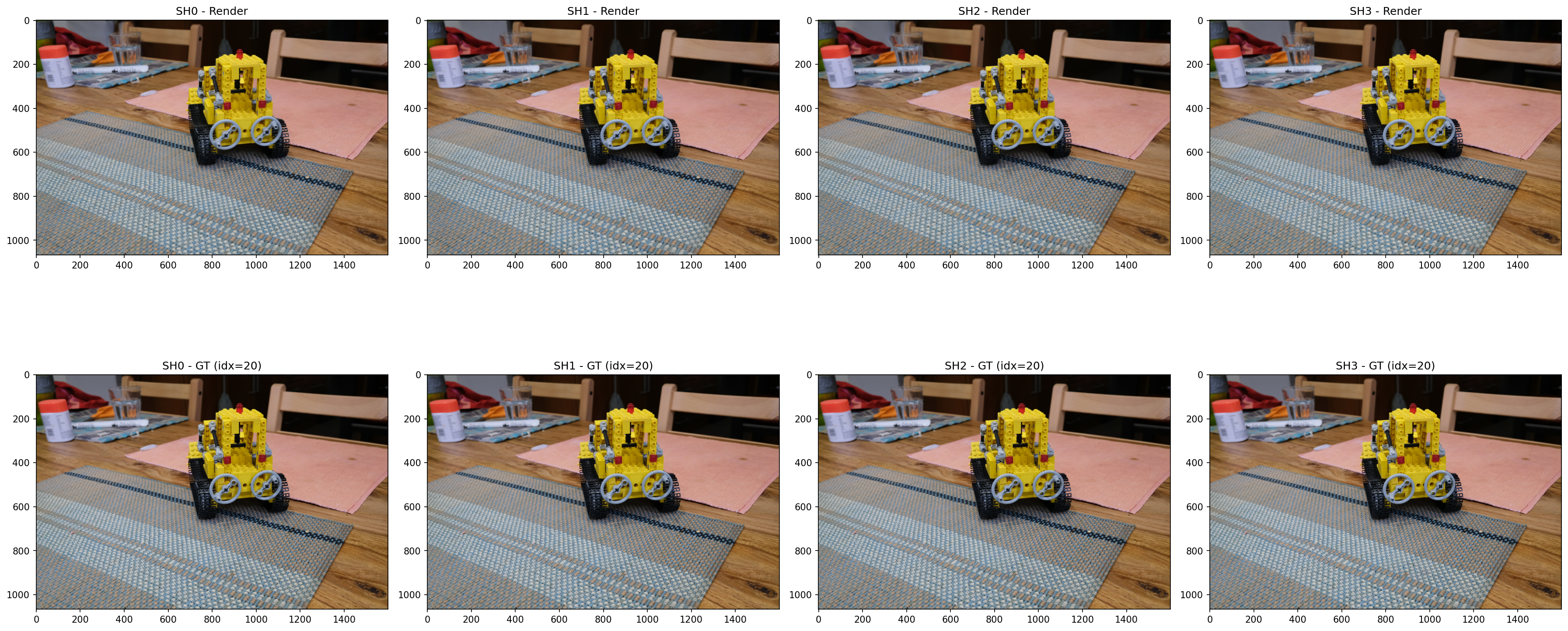 |
| 23 | SH degree 0 ~ 3 with ground truth Comparison | 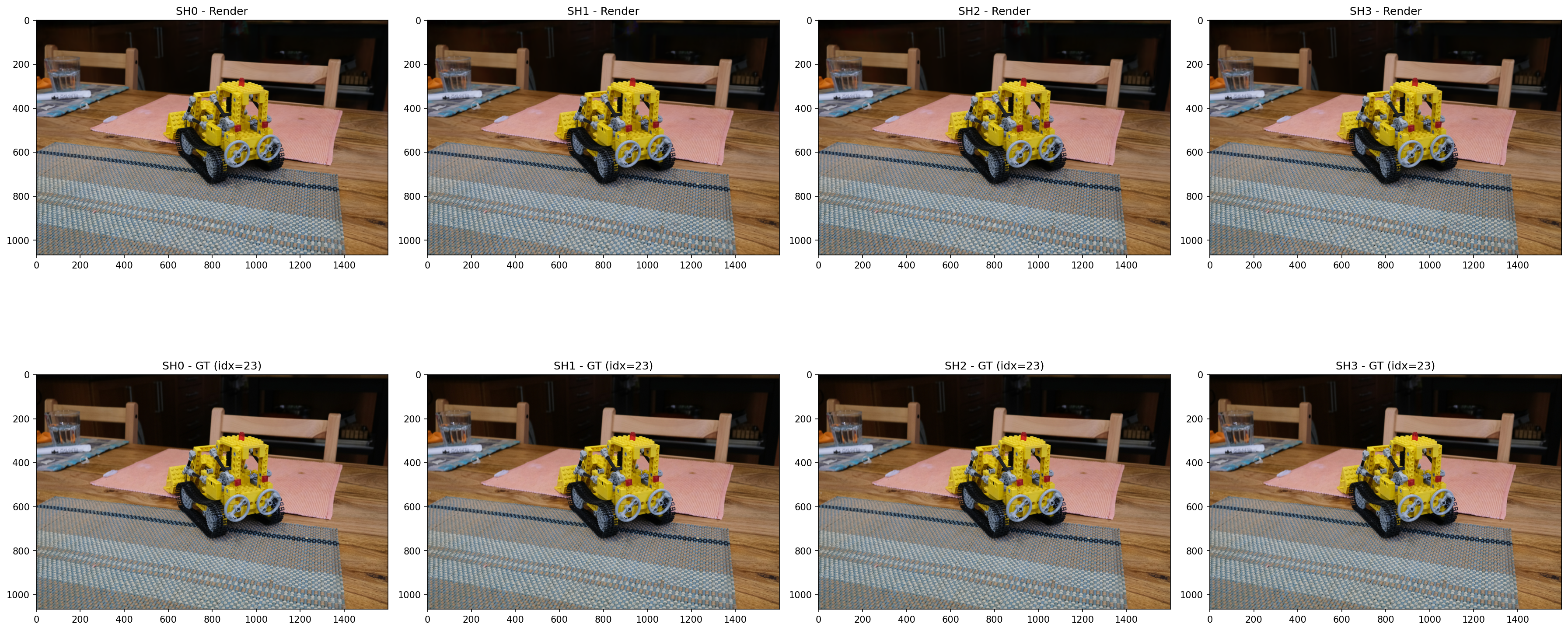 |
Hyperparameter 2: Densify Grad Threshold (densification)
- Controls when Gaussians are split/cloned during training based on the gradient magnitude
- Lower threshold → more aggressive densification → more Gaussians generated → better representation of thin structures (e.g. bicycle spokes, tree branches)
- Higher threshold → fewer Gaussians → faster training but worse representation of fine details
- Bicycle scene contains many thin structures (spokes, leaves, handlebars) that may benefit from aggressive densification and require 1–2 pixel level detail reconstruction
Parameters:
# Low (more Gaussians, detail ↑, VRAM ↑)
python train.py -s data/mipnerf360/bicycle --eval --densify_grad_threshold 0.0001 -m .../bicycle/dense_low

# Medium (default)
python train.py -s data/mipnerf360/bicycle --eval --densify_grad_threshold 0.0002 -m .../bicycle/dense_med

# High (fewer Gaussians, faster, detail ↓)
python train.py -s data/mipnerf360/bicycle --eval --densify_grad_threshold 0.0005 -m .../bicycle/dense_high
Results (30k iterations)
| Threshold | Config | SSIM | PSNR | LPIPS |
|---|---|---|---|---|
| 0.0001 | Low | 0.7719774 | 25.3083401 | 0.1857106 |
| 0.0002 | Medium (Base) | 0.7473353 | 25.1360970 | 0.2421628 |
| 0.0005 | High | 0.6516691 | 24.1706982 | 0.3792148 |
| Image Index | Description | Image |
|---|---|---|
| 0 | Densification Threshold Comparison (0.0001, 0.0002, 0.0005) with GT | 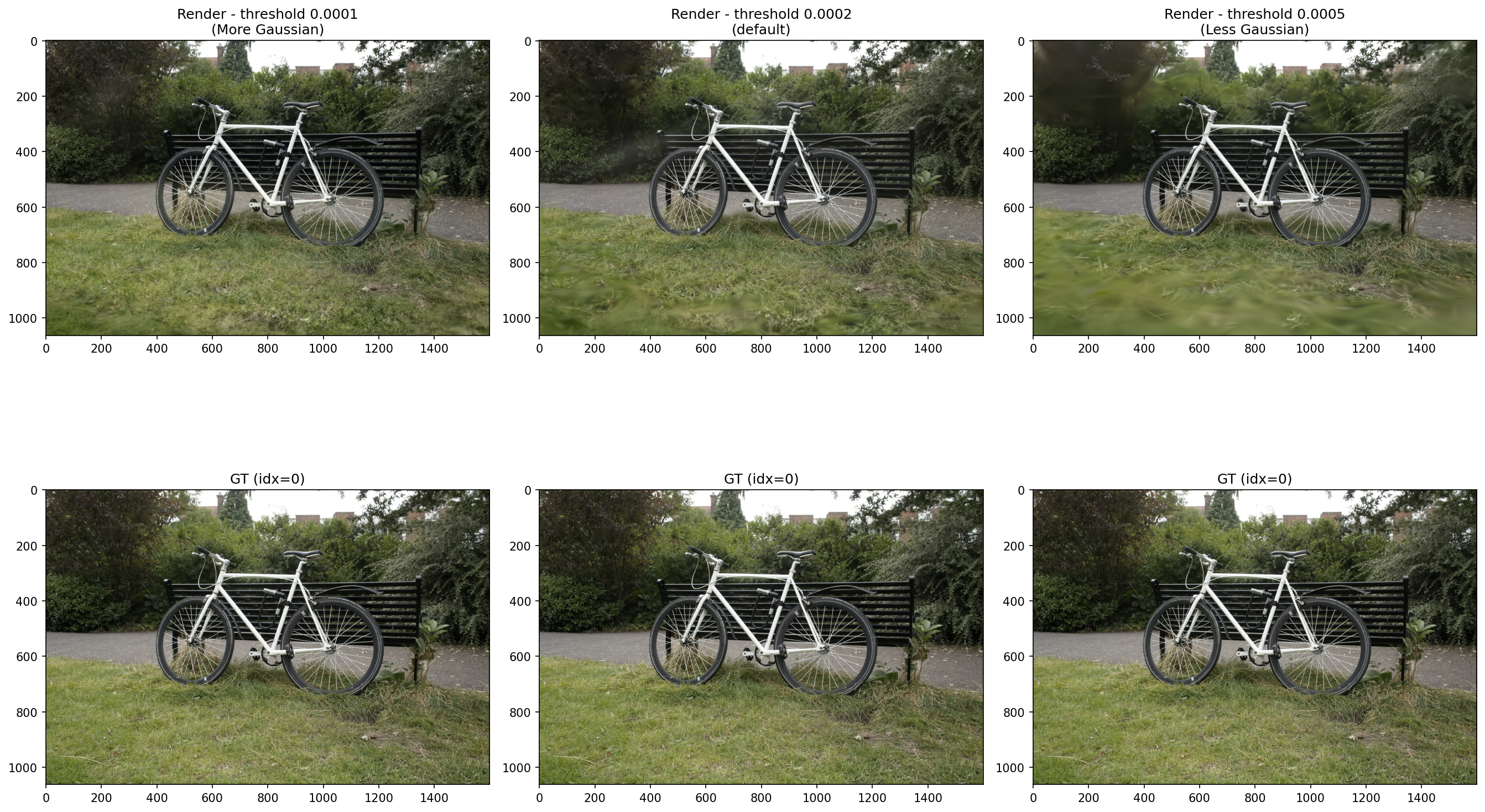 |
| 1 | Densification Threshold Comparison (0.0001, 0.0002, 0.0005) with GT | 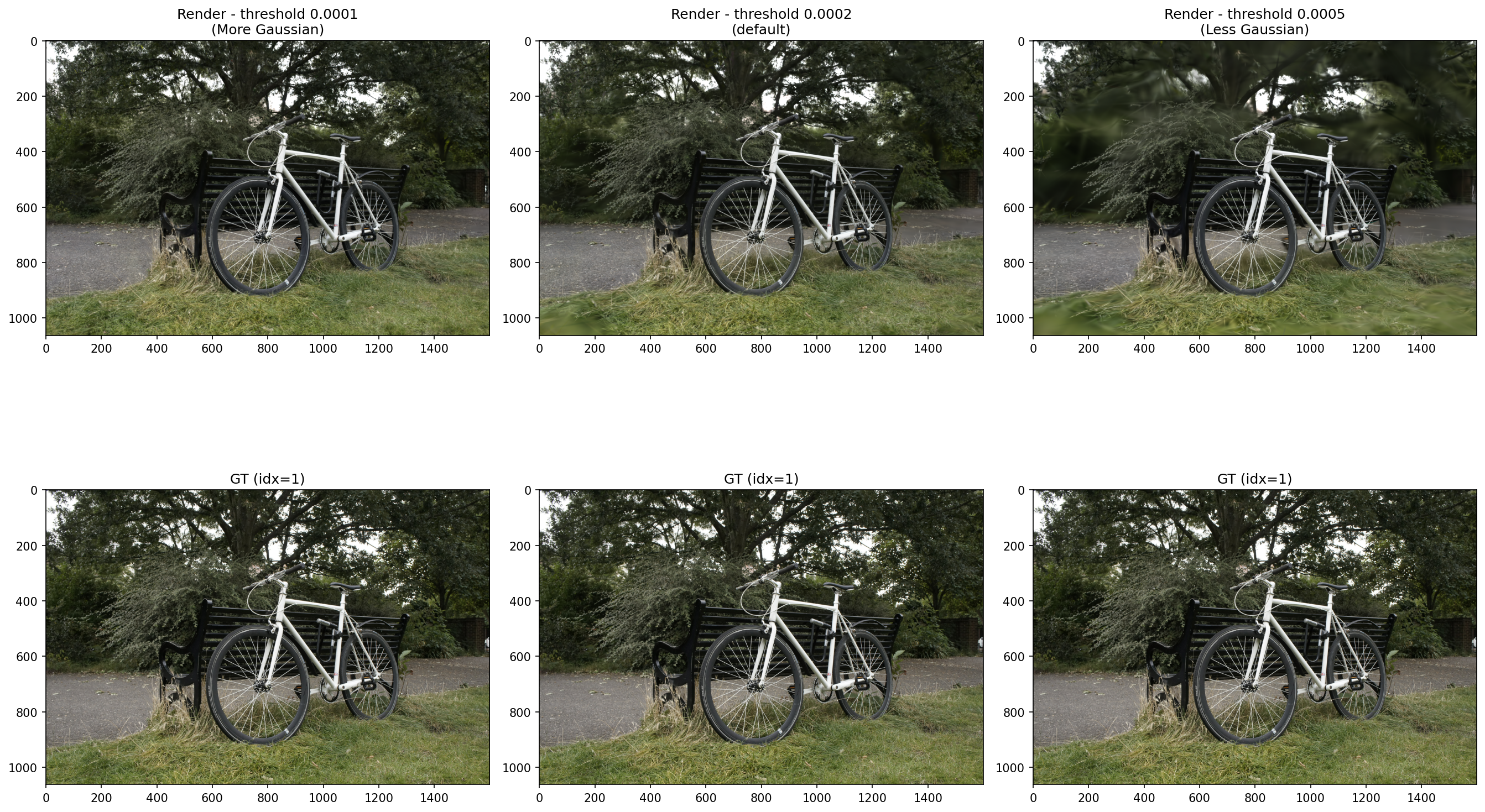 |
| 2 | Densification Threshold Comparison (0.0001, 0.0002, 0.0005) with GT | 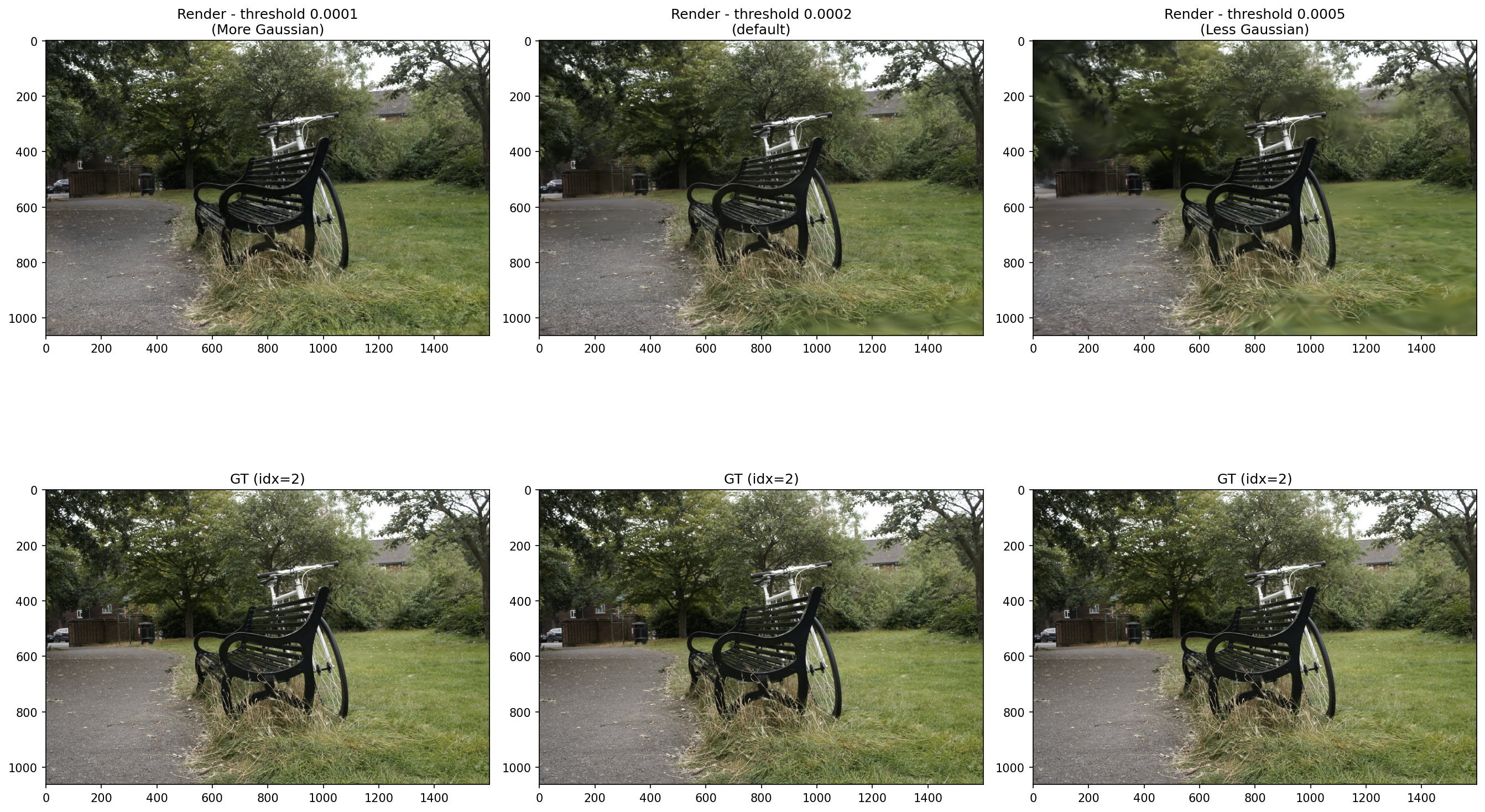 |
Observations
- SH degree 0: Reflective surfaces appear as flat, uniform color. No highlights
- SH degree 3: Highlights on pots and faucets shift as the camera angle changes
- Higher degree increases view-dependent effects but also increases VRAM usage and training time
- Diminishing returns: 0→1 gives the largest PSNR gain (+0.46), subsequent steps are smaller
Observations
- Lower threshold (more Gaussians) = higher PSNR/SSIM and lower LPIPS → better across all metrics
- LPIPS degrades more than 2x from Low → High (0.186 → 0.379) → thin structures deteriorate sharply
- However, more Gaussians = higher VRAM usage → memory constraints must be considered in practic
Hyperparameter 3: Number of Training Iterations (iterations)
Objective
- Does longer training improve quality? like NeRF?
- At what point does the model converge?
Parameters:
# 7k
python train.py -s data/mipnerf360/bonsai --eval --iterations 7000 --densify_until_iter 5000 -m .../bonsai/iter7k

# 30k (default)
python train.py -s data/mipnerf360/bonsai --eval --iterations 30000 -m .../bonsai/iter30k

# 50k
python train.py -s data/mipnerf360/bonsai --eval --iterations 50000 --densify_until_iter 25000 --test_iterations 7000 30000 50000 --save_iterations 7000 30000 50000 -m .../bonsai/iter50k
Results
| Iterations | SSIM | PSNR | LPIPS | PSNR Gain |
|---|---|---|---|---|
| 7k | 0.9323797 | 30.5002346 | 0.2045038 | - |
| 30k | 0.9468836 | 32.3352585 | 0.1800254 | +1.84 |
| 50k | 0.9468449 | 32.6032143 | 0.1798774 | +0.26 |
| Image Index | Description | Image |
|---|---|---|
| 5 | Iteration Comparison (7k, 30k, 50k) with GT | 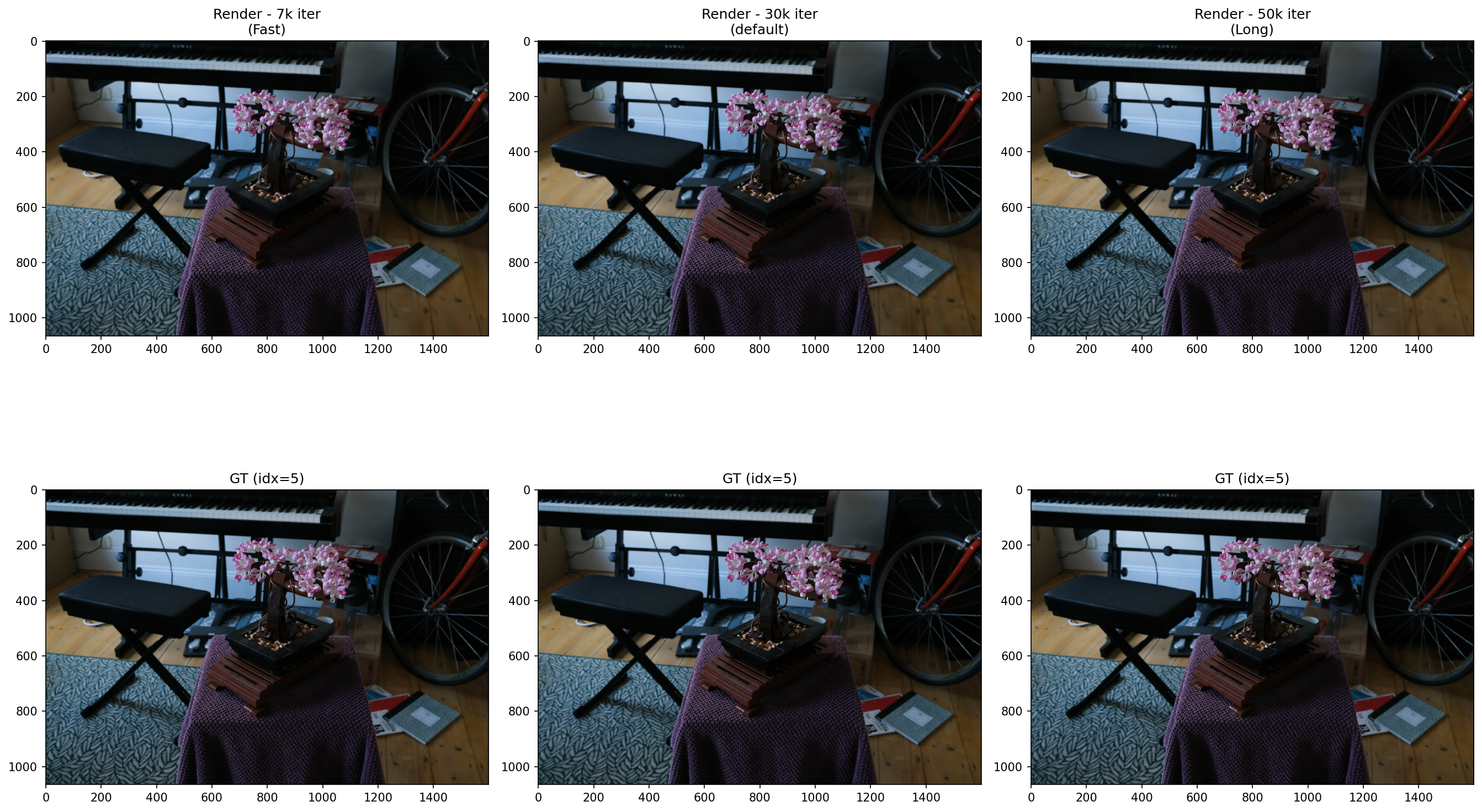 |
| 10 | Iteration Comparison (7k, 30k, 50k) with GT | 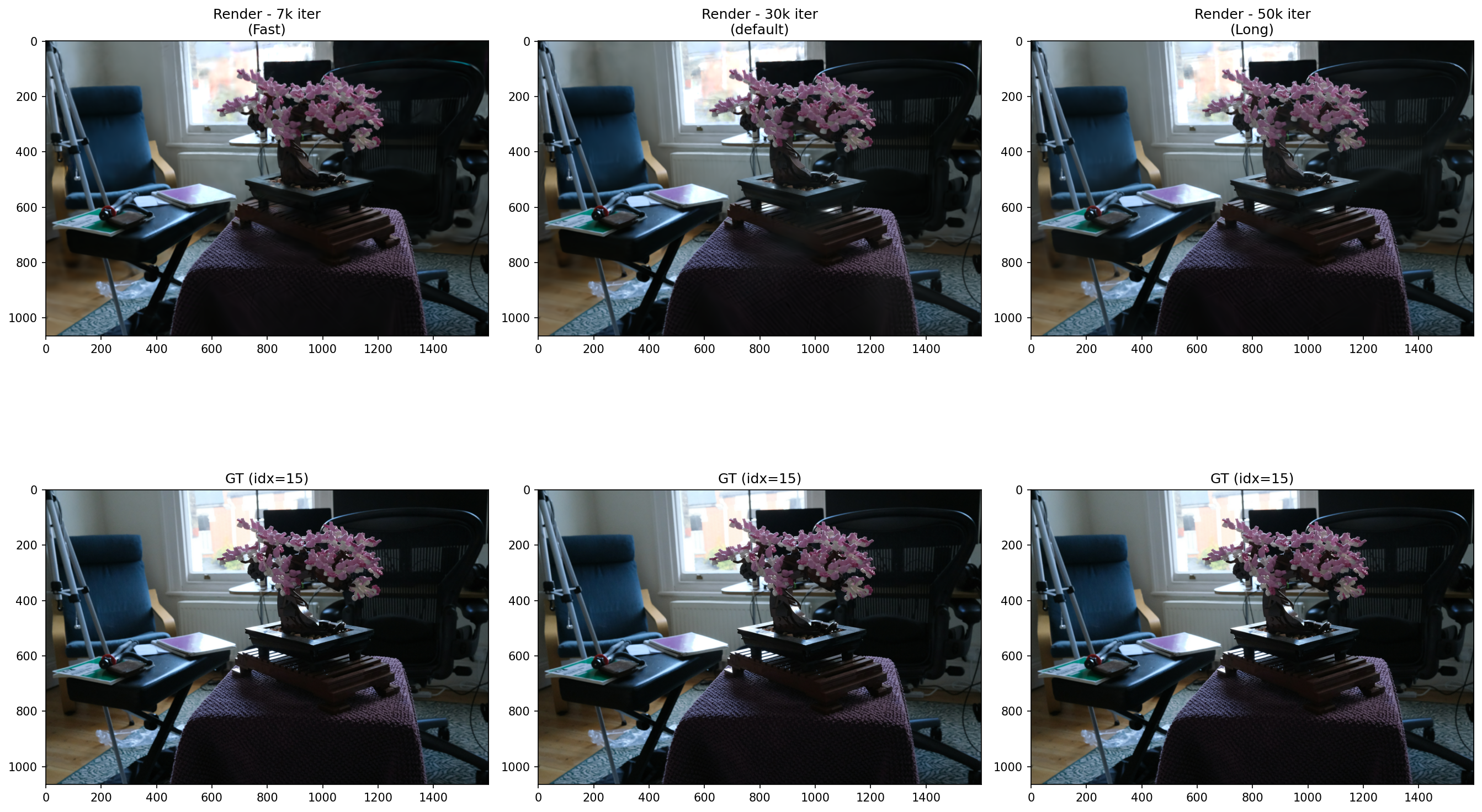 |
| 15 | Iteration Comparison (7k, 30k, 50k) with GT | 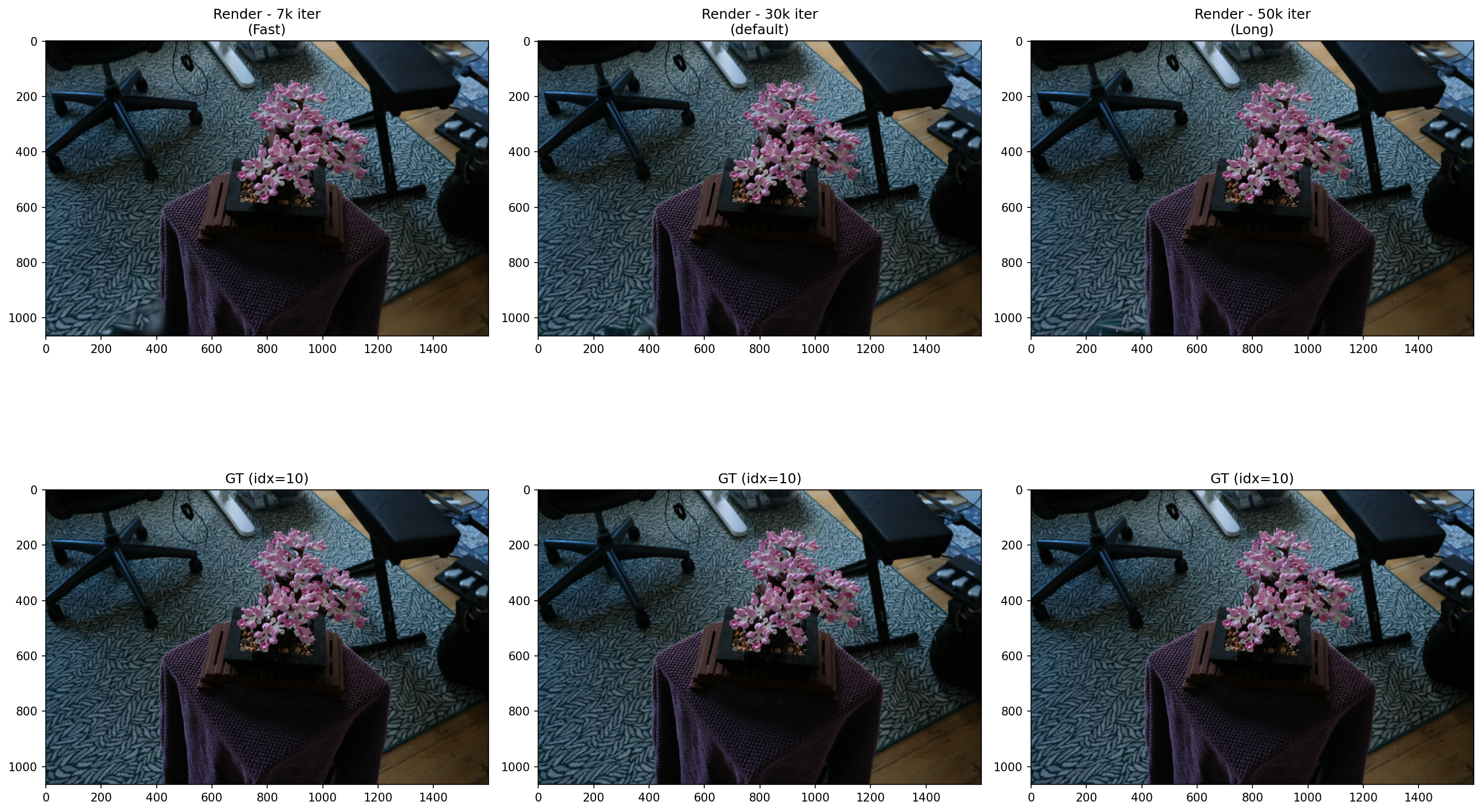 |
Observations
- 7k → 30k: PSNR +1.84 improvement. Leaf and stem sharpness clearly improved
- 30k → 50k: PSNR +0.26, SSIM nearly identical (0.9468) → convergence confirmed
- Conclusion: 3DGS converges at ~30k iterations. Training beyond 50k yields diminishing returns
Summary
| Experiment | Key Variable | Conclusion |
|---|---|---|
| Spherical Harmonics Degree | View-dependent color | Higher degree improves PSNR/SSIM and reduces LPIPS. Re-run with unified iterations for fair comparison |
| Densify Threshold | Gaussian count / thin structures | Lower threshold = better quality. VRAM trade-off exists |
| Iterations | Training time vs quality | Converges at 30k. Beyond 50k is inefficient |
Resource
- Repo History: https://github.com/sjang1594/3dgs-experiments/tree/main/experiments